




 We deliver to lockers!
Pick up your orders anytime, hassle-free!
 Fast Delivery!
Orders placed by 2:00 PM are shipped the same day. Delivered within 24h!
 2-Year Warranty
Reliable products, worry-free!
 Easy 14-Day Returns
Unused items? No questions asked!
Scanner that can be used for scanning 1D and 2D barcodes.
The development boards have a serial (UART) port that can be used to communicate with the scanner.
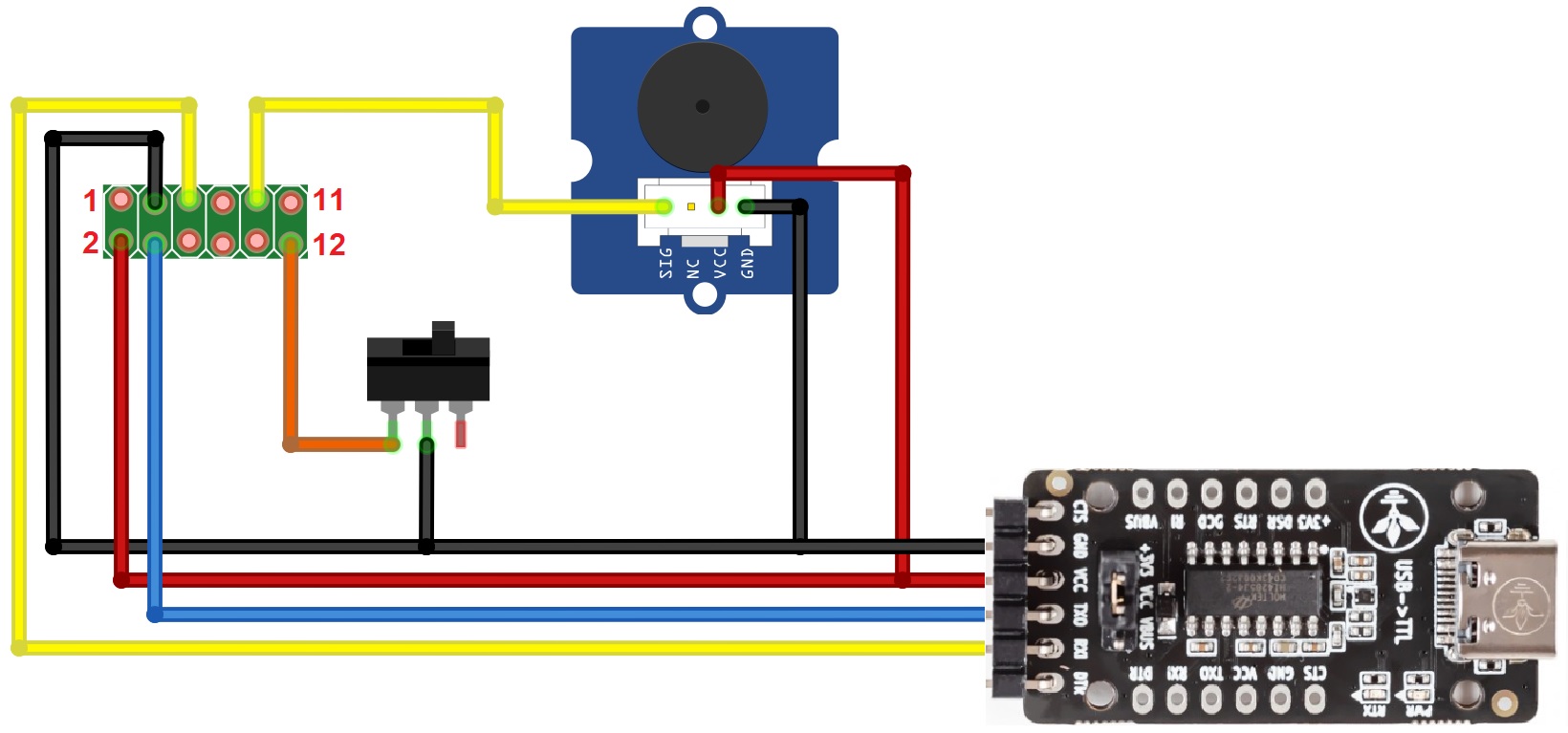
Below is an example of a connection using only a USB-Serial module; however, the module can easily be replaced with a development board while maintaining the same connection method.
| Pin No. | Name | Type | Description |
| 1 | NC | ||
| 2 | VCC | DC Power Supply | 5V DC |
| 3 | GND | Digital Ground | GND |
| 4 | Rx | Input | TTL serial input |
| 5 | Tx | Output | TTL serial output |
| 6 | USB_D- | Input/Output | D- signal |
| 7 | USB_D+ | Input/Output | D+ signal |
| 8 | NC | ||
| 9 | BPR | Output | Buzzer signal output |
| 10 | LED | Output | LED output indicating successful decoding, low-level signal 150ms |
| 11 | NC | ||
| 12 | TRIG | Input | Input signal to start scanning, low-level signal |
To complete this example, you will need the following:
1x Barcode scanner module E2100 RS232 || Reference AKLVUL_E2100_TTL
1x USB to Serial module HT42B534 GroundStudio || Reference UVEBZY_AAA
1x FPC GroundStudio 12-pin module || Reference UVNCQJ_AAA
1x Passive buzzer module || Reference DIHMTD_Buzz-pasiv
1x Microswitch || Reference TXAKQL_3JWD-DBHD-13.5-125
Various wires for making electrical connections
The FPC adapter module connects to the E2100 as shown in the image below:

The FPC module pins will then connect to the other components as follows:
| FPC | Holtek | Buzzer | Switch |
| PIN 2 | VCC | VCC | - |
| PIN 3 | GND | GND | NO |
| PIN 4 | TXO | - | - |
| PIN 5 | RXI | - | - |
| PIN 9 | - | I/O | - |
| PIN 12 | - | - | C |
After completing the above connections, connect the Holtek USB serial module to a computer and open a serial monitor with baud 9600.
For display, you can use Serial Monitor from Arduino IDE.

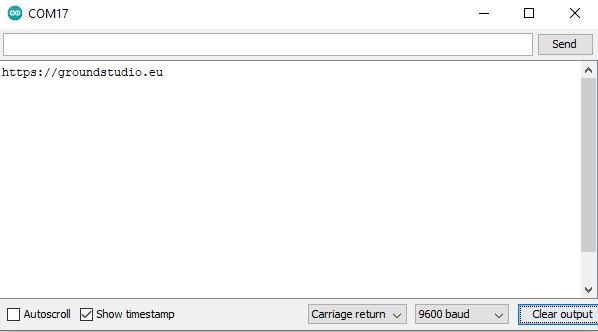
When a read is triggered by pressing the button, the scanner will light up the LED until a scan is performed.
The code will be transmitted via the serial port, and the LED will turn off until the button is triggered again.
To complete this example, you will need the following:
1x Barcode scanner module E2100 RS232 || Reference AKLVUL_E2100_TTL
1x GroundStudio Jade U1 || Reference RZUJBN_AAA
1x FPC GroundStudio 12-pin module || Reference UVNCQJ_AAA
1x Passive buzzer module || Reference DIHMTD_Buzz-pasiv
1x Microswitch || Reference TXAKQL_3JWD-DBHD-13.5-125
1x 0.96" I2C Blue OLED Display JMD0.96D-1 || Reference REANDH_OLED_12C_JMD
Various wires for making electrical connections
The FPC adapter module connects to the E2100 as shown in the image below:
The FPC module pins will then connect to the other components as follows:
| FPC | Uno | Display | Buzzer | Switch |
| PIN 2 | 5V | VCC | VCC | - |
| PIN 3 | GND | GND | GND | NO |
| PIN 4 | 3 | - | - | - |
| PIN 5 | 2 | - | - | - |
| PIN 9 | - | - | I/O | - |
| PIN 12 | - | - | - | C |
| - | SDA | SDA | - | - |
| - | SCL | SCL | - | - |
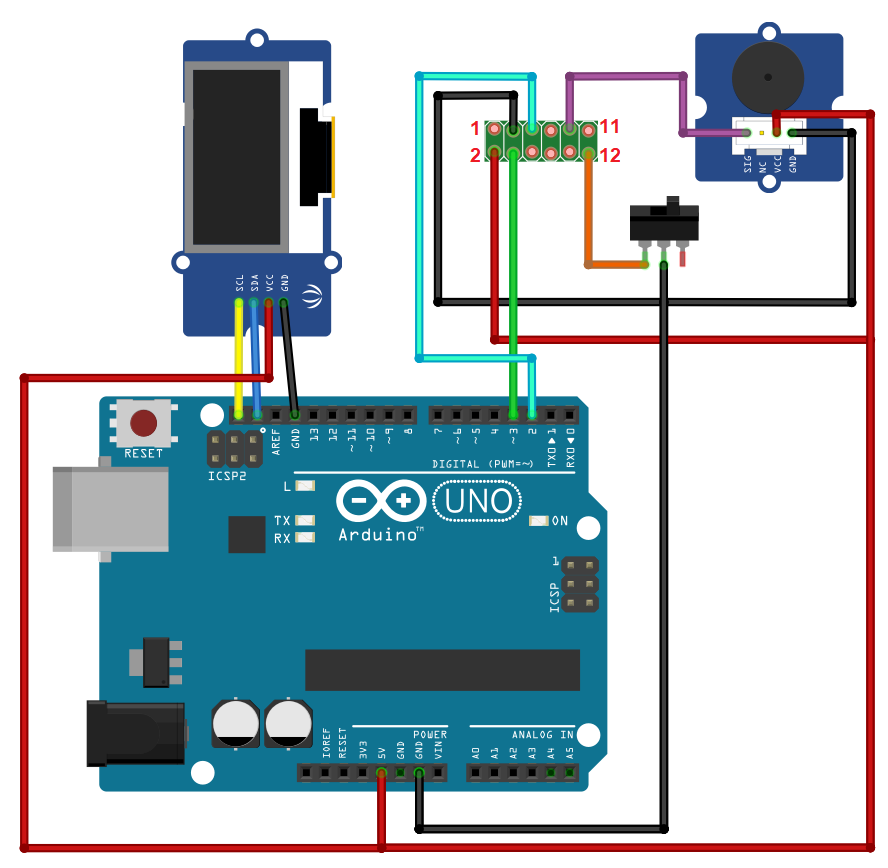
After completing the above connections, connect the development board to a computer and upload the "E2100-Scanner_SoftwareSerial.ino" code available at this LINK.
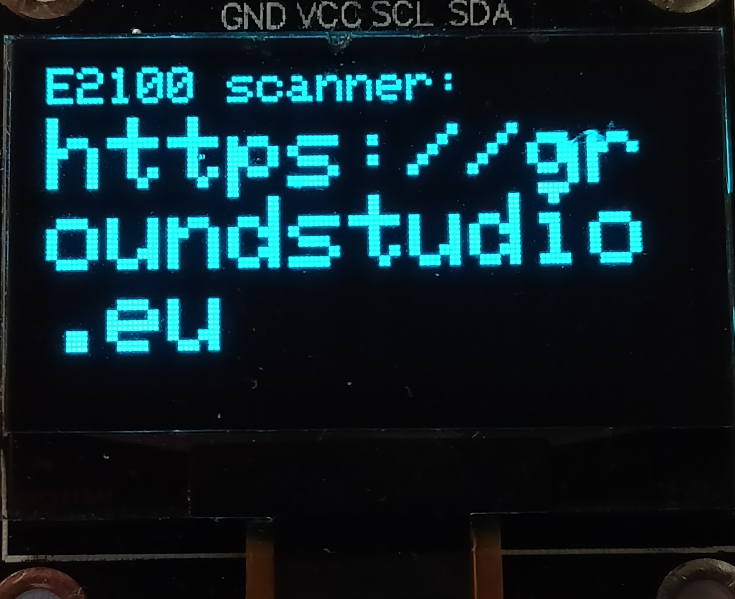
When a read is triggered by holding down the button, the scanner will light up the LED until a scan is performed.
The code will be transmitted via the serial port and displayed on the screen, and the LED will turn off until the button is triggered again.
1x Barcode scanner module E2100 RS232
1x 12p 60mm flexible cable with 0.5mm pitch
Specific References
Your review appreciation cannot be sent
Report comment
Report sent
Your report cannot be sent
Write your review
Review sent
Your review cannot be sent
check_circle
check_circle